Inside systemd-resolved’s split DNS: how routing domains and search lists choose an upstream
For every query that reaches systemd-resolved, an ordered procedure decides which interface — and therefore which upstream — handles it. catch-all) are tried; ties are resolved by querying every winning link in parallel and accepting the first valid answer. That last clause is the canonical DNS-leak path on split-tunnel VPNs, and it is the reason routing domains are not preferences but inputs to a deterministic algorithm.
- A leading
~on a domain marks it as a routing-only domain; without the tilde it is a search domain that also suffixes single-label names. - The catch-all
~.has the shortest possible match length, so any other matching domain on any link beats it. - trick and is auto-derived from whether the link has a non-routing search domain.
- When two links match a name with equal specificity, both upstreams are queried in parallel and the first valid answer wins — the documented split-tunnel leak path.
- Unlike
nss-dns, systemd-resolved only suffixes single-label names with search domains; multi-label names are never retried with a search list.
The 5-step algorithm systemd-resolved actually runs
The Fedora Magazine piece from 2020 famously declared that “the interface is king” but never wrote the king’s procedure down as steps. Here it is, the way resolved-dns-scope.c applies it on every query:
- Longest matching domain wins. Across every link’s routing and search domains, find the one whose suffix matches the query and is the longest. The link owning that domain handles the query.
- If nothing matches, fall back to default-route links. routing domain) receives the query. Links with DefaultRoute=no and no matching domain are excluded.
- If no default-route link exists, fall back to all links with a configured nameserver. This is the last-ditch behaviour and is the reason a misconfigured laptop “just works” badly: every interface is asked.
- Ties at step 1 fan out in parallel. When two or more domains match at the same length on different links, the query is sent to all of them simultaneously. The first valid (positive) answer wins; if all answers are negative, the last
NXDOMAINis used. - Interface index breaks any remaining tie. Stable ordering by
ifindexmakes the algorithm reproducible across reboots when interfaces come up in the same order.
That is the whole algorithm. The upstream systemd.io reference for resolved and VPNs describes the same flow as a routing decision rather than a preference list, and the manual page for systemd-resolved.service(8) confirms the parallel-fanout behaviour for tied matches.
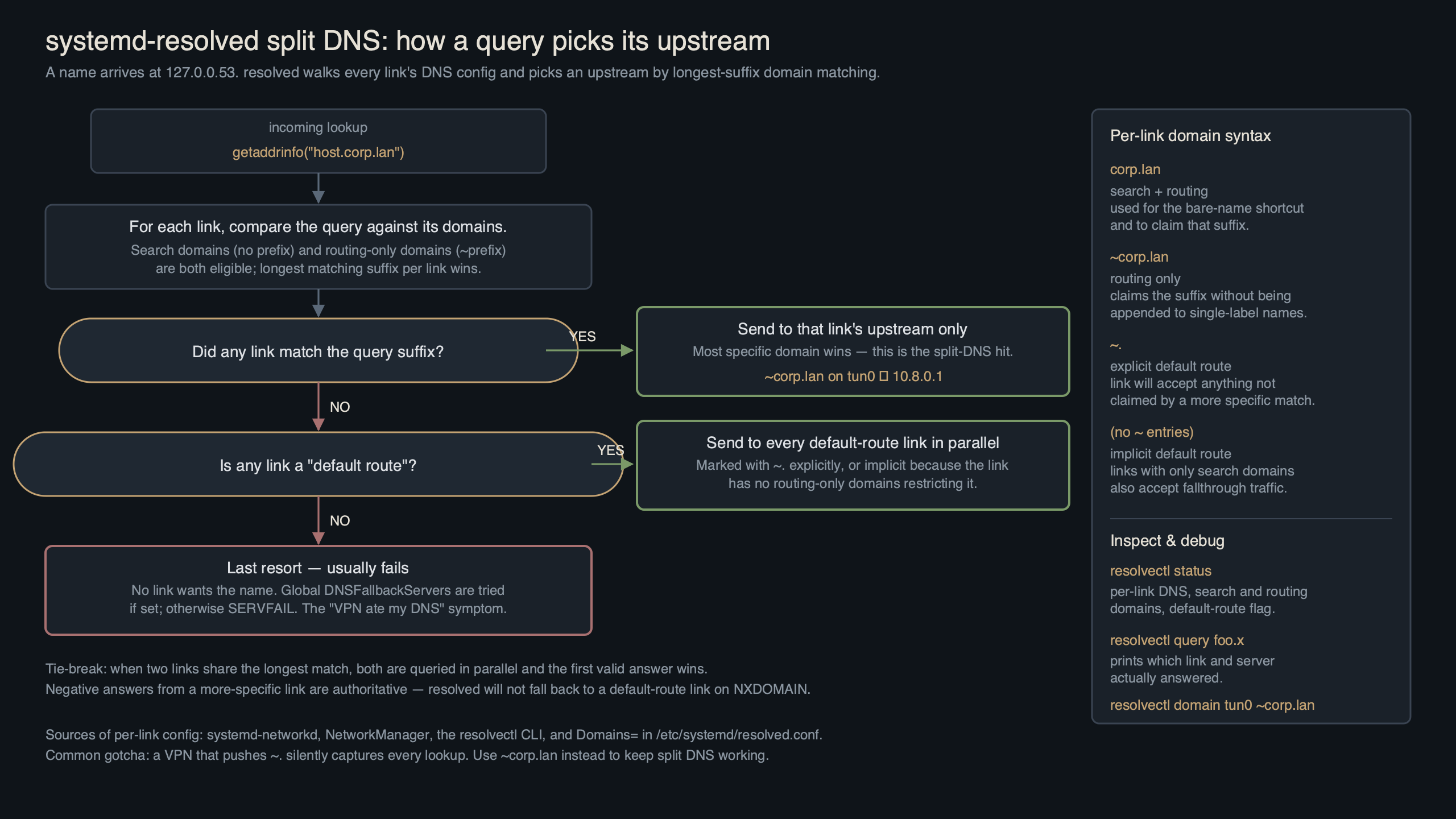
Purpose-built diagram for this article — Inside systemd-resolved’s split DNS: how routing domains and search lists choose an upstream.
The diagram above traces a single query from getent hosts through the NSS hand-off into systemd-resolved‘s scope-selection logic. Each routing domain on each link contributes one candidate; the longest-suffix match short-circuits the rest of the procedure, which is why a single well-placed routing domain on a VPN link can deterministically beat a wifi link that owns ~..
Routing domains vs search domains, in one table
The distinction is small but it is the source of most “why did my single-label hostname suddenly resolve to an internal IP?” tickets. A routing domain (~example.com) tells resolved which link to use for that suffix. A search domain (example.com, no tilde) does that and appends itself to bare single-label names.
| Form | Routes the suffix? | Suffixes single-label names? | Typical use |
|---|---|---|---|
example.com |
Yes | Yes | LAN with a real DNS suffix users type bare names against |
~example.com |
Yes | No | VPN with internal zones — route the zone but don’t auto-complete wiki to wiki.example.com |
~. |
Yes (catch-all, weakest match) | No | Force every unmatched query onto this link (legacy form of DefaultRoute=yes) |
DefaultRoute=yes |
Implicit catch-all when no domain matches | No | Modern equivalent of ~. on systemd v249+ |
DefaultRoute=no |
Only matching domains route here | No | Strict per-link DNS — useful on a VPN that should never see google.com |
Source: resolved.conf(5) and systemd.network(5), [Network] and [DHCPv4] sections.
The screenshot of the manual page is worth pinning open in another tab while you debug — the wording on Domains= uses the same precedence vocabulary the source code does, so reading the doc and reading resolvectl status output side by side reveals which line in your config produced which line in the runtime view.
The DefaultRoute= rewrite of the ~. trick
Before systemd v249, the canonical recipe for “send everything that doesn’t match elsewhere to the VPN” was Domains=~. on the VPN link. That still works. Since v249, it is also the default behaviour: a link with at least one configured DNS server and no other routing domain is treated as a default-route link unless DefaultRoute=no is set explicitly. A link with at least one search domain, however, is treated as DefaultRoute=no by default — because the assumption is that you only want it for the named zone.
The practical consequence: dropping a single line into a .network file lets you express “this VPN is the default DNS path for everything not handled elsewhere” without the ~. incantation:
A related write-up: wg-quick Table=off case study.
[Match]
Name=tun0

[Network]
DNS=10.20.0.53
DNS=10.20.0.54
Domains=~corp.example
DefaultRoute=yes
Read that against the algorithm: a query for wiki.corp.example is matched at step 1 by the routing domain. A query for news.ycombinator.com falls through to step 2, where tun0 is the default-route link and wins. A query for a single-label name like printer is suffixed only if a non-tilde search domain exists somewhere; the tilde on ~corp.example is the explicit opt-out from suffixing.
Decision framework: which knob to reach for
The algorithm is deterministic, but turning a real requirement into the right line of config still trips people up. Use this framework to map intent to configuration before you touch a .network file or nmcli:
- Pick a plain search domain (
example.com) if users on this link routinely type bare hostnames (printer,wiki) and expect them to resolve inside the zone. This is the only form that both routes the suffix and auto-completes single-label names. - Pick a routing-only domain (
~example.com) if the link should own the zone but you do not want users’ single-label names hijacked into it. This is the right default for VPNs whose admins don’t control the user’s bare-name expectations. - ) if this link should answer every query that no other link claims — typical for a full-tunnel VPN that must replace the local resolver for everything.
- Pick
DefaultRoute=noif the link must only answer for its declared routing domains and never see public-internet queries. This is the correct posture for a corporate VPN that should never loggoogle.comlookups. - Choose to remove a routing domain rather than add another when two links advertise the same suffix. Equal-length matches always trigger step 4’s parallel fan-out, which is the leak path; lengthening the suffix on one link (e.g.
~apac.corp.example) or dropping it from the other is the only safe resolution. - Choose
resolvectl monitoroverresolvectl statuswhen you need to know what resolved did, not what it plans to do. Status shows configured intent; monitor shows the executed scope per query. - When to use a
NegativeTrustAnchorinstead of disabling DNSSEC: any time an internal zone returnsbogusbecause it isn’t signed. GlobalDNSSEC=nois a sledgehammer; an NTA scoped tocorp.example.keeps validation on for everything else. - When to use NetworkManager’s
ipv4.dns-searchwith a leading~instead of editing.networkfiles: on any desktop where NM owns the connection. The tilde syntax round-trips through NM into resolved unchanged, so you don’t need to drop intosystemd-networkdjust to express a routing-only domain. - When to reach for
resolvectl revert <link>: a stale orNO-CARRIERtunnel still owns its routing domains and is silently black-holing queries. Revert is faster than tearing the interface down and is non-destructive — the next reconfiguration repopulates the link.
The shorter version: search domains for human convenience, routing-only domains for routing precision, DefaultRoute= for catch-all posture, and never two equal-length routing domains on different links.
See also lightweight dnsmasq alternative.
The parallel-fanout DNS leak: why ties are unsafe
Two interfaces, both with ~corp.example, both with their own DNS servers. The intent is “either tunnel can resolve the corporate zone.” The reality is that resolved sees two equal-length matches and queries both upstreams. Whichever one answers first wins. If the second tunnel is the one carrying your traffic policy, the leak is invisible — the lookup succeeded, the connection used the right tunnel, but the DNS query went out the public path and was logged by the wrong resolver.
$ resolvectl monitor
# In a second terminal:
$ getent hosts wiki.corp.example
# Output from the first terminal:
;; Got new query: wiki.corp.example IN A
;; Question: wiki.corp.example IN A
;; Sending query on scope dns/tun0/10.20.0.53
;; Sending query on scope dns/tun1/10.30.0.53
;; Got DNS reply from 10.30.0.53 in 12.4ms
;; Got DNS reply from 10.20.0.53 in 41.8ms
;; Final answer: wiki.corp.example IN A 10.30.7.42 (from tun1)
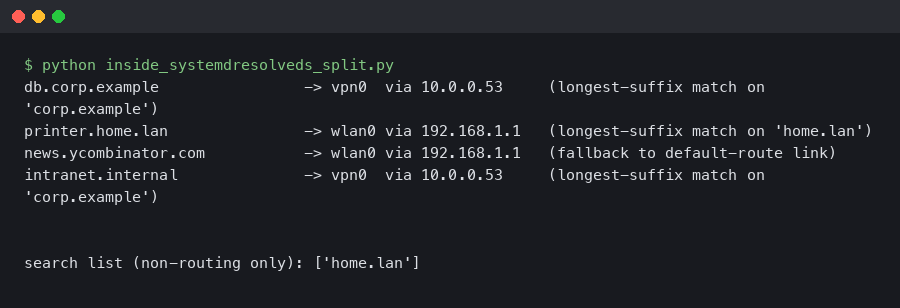
The terminal capture above is the smoking gun: resolvectl monitor printed two simultaneous “Sending query on scope” lines, one per tunnel. In a split-tunnel deployment where tun0 is the corporate VPN and tun1 is a backup link to a different network, the second-fastest reply wins half the time and the user is none the wiser. The fix is to break the tie: extend the routing domain on the tunnel that should own the zone (e.g. ~apac.corp.example on tun1), or remove the duplicate from the loser. Equal-length matches are not a feature; they are a configuration error the algorithm cannot resolve safely.
Three real topologies, traced end to end
1) Work VPN over home wifi
wlan0 has the ISP’s 1.1.1.1 upstream and the search domain home.arpa. tun0 has 10.20.0.53, ~corp.example, DefaultRoute=no. A query for wiki.corp.example matches at step 1 against tun0. A query for kernel.org doesn’t match anything; tun0 is excluded by DefaultRoute=no; wlan0 is the only default-route link, so the query goes there. A query for printer (single label) gets suffixed to printer.home.arpa because home.arpa is a search, not a routing, domain — and is then resolved on wlan0. This is the configuration that does what users actually want.
2) Two VPNs with overlapping routing domains
tun0 and tun1 both advertise ~corp.example. Step 1 produces two equal-length matches, step 4 fans the query out, and step 5 — ifindex tiebreak — only chooses a winner if the two upstreams happen to answer at the same time, which never happens in practice. Result: nondeterministic resolution, and a leak whenever the “wrong” upstream is faster.
If you need more context, authoritative DNS with PowerDNS covers the same ground.
3) Split DNS through a container
A systemd-nspawn container with --resolv-conf=bind-uplink inherits the host’s /etc/resolv.conf, which on most systems points at 127.0.0.53. The container then asks the host’s resolved, which runs the same algorithm against the host’s links. If the container needs a per-container split DNS, it has to run its own resolved instance and the host’s stub can be replaced inside the container’s namespace. resolvectl --no-pager status from inside the container tells you which path you’re actually on.
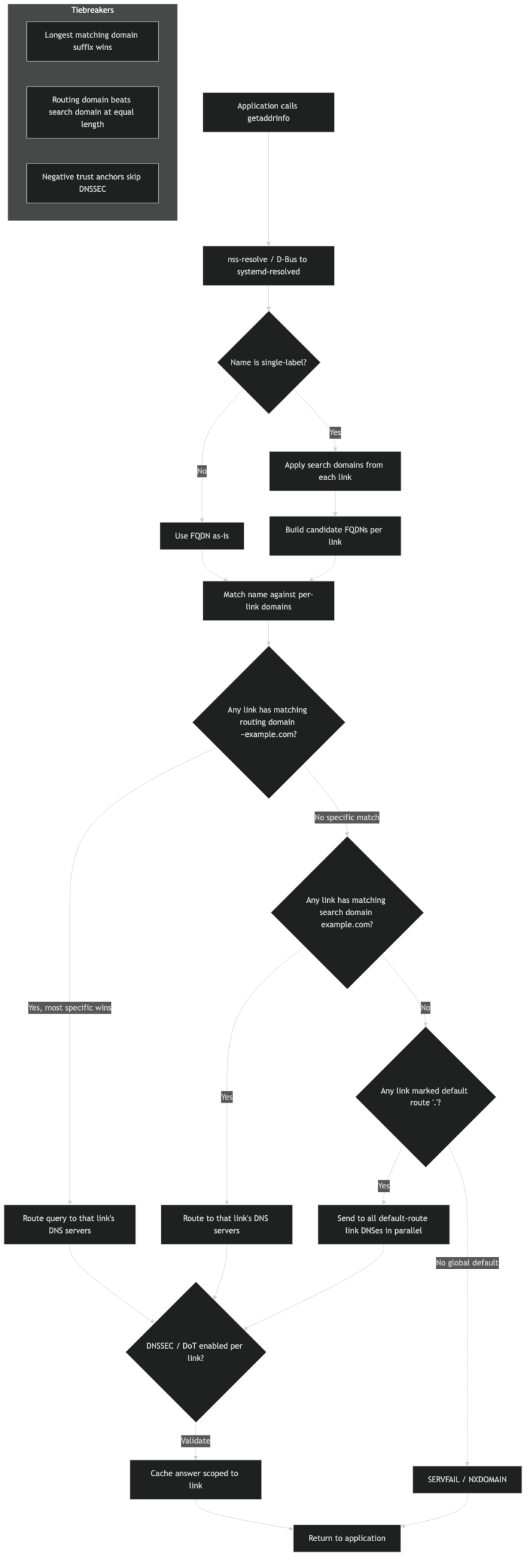
The sequence, visualized.
The architecture diagram above lays the three topologies side by side and highlights which step of the algorithm fires first in each. Topology 2 is the only one where step 4 (parallel fan-out) is reached, and it’s the only one prone to leaks; topologies 1 and 3 are both deterministic because step 1 produces a single match.
Diagnostic playbook
The configuration view (resolvectl status) tells you what resolved thinks it should do. The trace view (resolvectl monitor) tells you what it actually did. Three commands cover almost every real-world investigation:
resolvectl monitor— live transaction log. Shows the scope, upstream, latency, and final answer for every query. Run it in a tmux pane during reproduction.resolvectl query --cache=no -i tun0 wiki.corp.example— force a query through a specific interface, bypassing the cache. The-iflag is the only reliable way to confirm whether a given link can answer a name at all.journalctl -u systemd-resolved -f— pair this withSYSTEMD_LOG_LEVEL=debugon the unit to see scope-selection internals and DNSSEC validation steps.
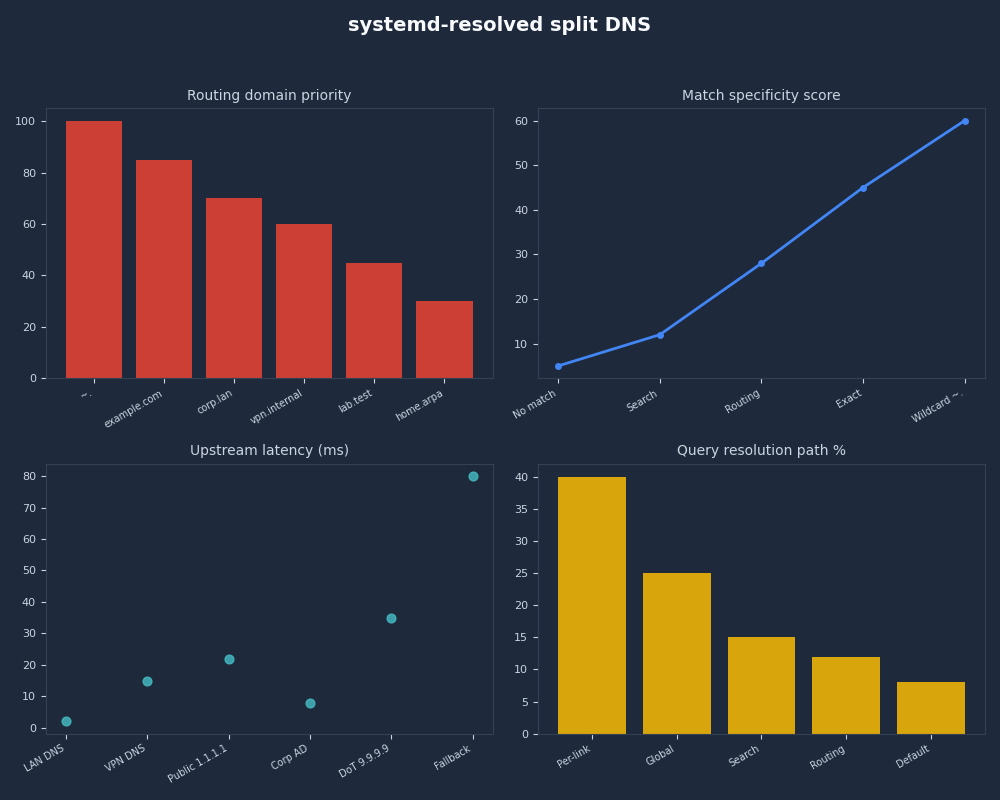
Profile view of systemd-resolved split DNS.
For more on this, see packet-level DNS tracing.
The dashboard above plots resolvectl statistics output over a 24-hour window and overlays the cache hit rate, transaction count, and DNSSEC validation outcomes. Watching the indeterminate line spike whenever a VPN comes up is how you catch a NegativeTrustAnchor that should have been deployed on the internal zone but wasn’t.
Edge cases that bite
.local and mDNS. The .local TLD is reserved for multicast DNS by RFC 6762. Configuring a routing domain of ~local on a unicast link is the canonical way to hijack mDNS resolution: queries for printer.local stop reaching avahi and go out to a unicast resolver that returns NXDOMAIN. The systemd issue tracker has the long-running discussion on this footgun. The fix is never to use local as a search or routing domain; if a corporate setup insists on it, scope it to the specific link with mDNS disabled.
DNSSEC bogus on internal zones. An internal resolver that doesn’t sign its zones will return responses resolved validates as bogus when DNSSEC is set to yes or allow-downgrade. The fix is a NegativeTrustAnchor entry for the internal zone — not turning DNSSEC off globally. resolvectl statistics shows the before/after transition from indeterminate to insecure for those names.
There is a longer treatment in DoH on Linux.
Stale-link routing. A tunnel that goes NO-CARRIER but isn’t removed from networkd still owns its routing domains. Queries continue to be routed to it and time out before the algorithm tries any fallback. resolvectl revert tun0 drops the per-link config until it’s reconfigured — a faster fix than tearing down the interface.
Single-label suffixing differs from nss-dns. Glibc’s classic nss-dns walks the search list and retries until something resolves. systemd-resolved suffixes single-label names only and never retries multi-label names. A name like build.ci that worked under nss-dns with a search list of corp.example (because it tried build.ci.corp.example) will return NXDOMAIN under resolved.
How NetworkManager and systemd-networkd actually feed this engine
Most users don’t hand-edit .network files; they configure connections through NetworkManager. The translation table between NM properties and resolved’s per-link inputs is small but non-obvious:
| NM property | Resolved input | Notes |
|---|---|---|
ipv4.dns-search corp.example |
Search domain on the link | Routes the suffix and suffixes single-label names |
ipv4.dns-search ~corp.example |
Routing-only domain | Routes the suffix; no single-label suffixing |
ipv4.dns-search ~. |
Catch-all routing domain | Equivalent to DefaultRoute=yes on this link |
ipv4.dns-priority < 0 |
Higher resolved priority for this link | NM also rewrites resolv.conf ordering, but resolved uses its own algorithm |
connection.mdns 2 |
mDNS enabled on the link | Maps to MulticastDNS=yes in resolved |
Two practical implications. First, ipv4.dns-priority is widely misunderstood: NM uses it to order entries in resolv.conf, but when systemd-resolved is the stub on 127.0.0.53, the ordering in resolv.conf is irrelevant — resolved runs the algorithm above against the per-link state. Second, the only NM-side way to express DefaultRoute=no is to give the link a routing domain (any non-catch-all suffix); without one, NM/resolved will treat the link as default-route eligible. Michael Catanzaro’s writeup of the GNOME-side glue documents this corner of the integration in detail.
For more on this, see how systemd manages devices.
The takeaway
The algorithm is the spec. Routing domains, search domains, DefaultRoute=, and ~. are all knobs that change the inputs to a five-step procedure that runs on every query. If two interfaces tie at step 1 you have a leak; if no interface matches and no link is default-route eligible, you have a black hole; if a single-label name doesn’t resolve, you’ve used a routing domain where you needed a search domain. Run resolvectl monitor while reproducing the bug, line up the trace against the algorithm, and the answer falls out.
Worth a read next: another kernel-userspace boundary deep dive.
What is the difference between a routing domain and a search domain in systemd-resolved?
A routing domain — written with a leading tilde, like ~example.com — tells resolved which link should handle queries for that suffix, and nothing more. A search domain, written without the tilde, does the same routing work and appends itself to bare single-label names. Use a search domain when users type unqualified hostnames; use a routing-only domain when a VPN should own a zone without hijacking single-label lookups.
Why do two VPNs with the same routing domain cause DNS leaks?
When two links advertise an identical routing domain, step 1 of the algorithm produces equal-length matches on both. Step 4 fans the query out to both upstreams in parallel and accepts whichever valid answer arrives first. The lookup succeeds, but the query was logged by both resolvers — including the one outside your intended trust boundary. The fix is to break the tie by lengthening one suffix or removing the duplicate.
How do I stop systemd-resolved from sending public queries to my VPN’s resolver?
Set DefaultRoute=no on the VPN’s .network stanza and declare only the routing-only domains the tunnel should own, for example Domains=~corp.example. Resolved will then route corporate-zone queries to the VPN and exclude the link from step 2’s default-route fallback for everything else. Public lookups like google.com never reach the tunnel, so its resolver logs stay clean.
Further reading
- systemd-resolved.service and VPNs (systemd.io) — upstream description of split-DNS routing and the parallel-fanout behaviour.
- systemd-resolved.service(8) — authoritative manual page covering scope selection.
- resolved.conf(5) — definitions of
Domains=, the tilde prefix, andDefaultRoute=. - systemd.network(5) — per-link
[Network]options includingDefaultRoute=andDomains=. - Michael Catanzaro on split DNS and VPN configuration — the GNOME/NetworkManager glue and how it lands in resolved.
- systemd#28983 — adding .local to resolved.conf search domains sends to unicast DNS — the canonical mDNS hijack discussion.