
Flatpak vs Snap for desktop apps in 2026
The “Snap is slow, Flatpak is fast” verdict on the front page of most search results was measured on spinning disks before snapd switched its default compression from XZ to LZO and before recent Flatpak releases adopted OCI-based delta updates. On a current NVMe desktop the cold-start gap is real but small — roughly a second per first launch — while the disk-footprint gap is large and grows in Flatpak’s favour with every additional app you install. Warm starts are a wash.
Sections
- The 2026 verdict in one paragraph
- Why Snap cold start is slower: the squashfs, AppArmor, and cgroup tax
- Disk footprint is a marginal-cost curve, not a number
- Warm start is a tie, and that’s why benchmarks disagree
- What changed in 2024–2025 that the old comparisons miss
- A decision rubric keyed to how many apps you install
- A reproducible benchmark recipe you can run in five minutes
- When the format choice doesn’t matter
- Further reading
- Snap first-launch overhead comes from a squashfs loop mount, an AppArmor profile load, and a fresh cgroup; Flatpak skips the mount and reuses a long-running bubblewrap sandbox path.
- Canonical’s own measurements put LZO-compressed snaps at 40–74% faster cold start than XZ-compressed ones, so the legacy gap quoted in 2023 articles has already closed substantially.
- Flatpak’s OSTree backend stores files content-addressed and checks them out as hardlinks, so two GNOME apps that share a runtime store that runtime exactly once on disk — described in the official Flatpak architecture docs.
- Warm-start times are dominated by xdg-desktop-portal startup and GTK/Qt theme loading, not by the packaging format — a fact the dominant SERP results never mention.
- The right decision rubric for 2026 is “how many apps will I install and on what disk?”, not “which is more secure?” — both sandboxes are adequate for desktop use.
The 2026 verdict in one paragraph
If you install one or two desktop apps on top of a Fedora 41 or Ubuntu 24.04 system on NVMe storage, the choice between Flatpak and Snap is close to a coin flip and you should follow what your distro ships by default. Once you cross three or four apps that share a runtime — anything built on the GNOME or KDE platform stack — Flatpak pulls ahead on disk because OSTree dedup folds the shared layers into one copy. Snap continues to spend a fixed first-launch tax on every app for life, because each snap is its own immutable squashfs that gets mounted at runtime. Neither format is “broken.” The 2023-vintage claim that Snap is unconditionally slow is no longer true; the equally common claim that Flatpak is unconditionally smaller is only true past a threshold.
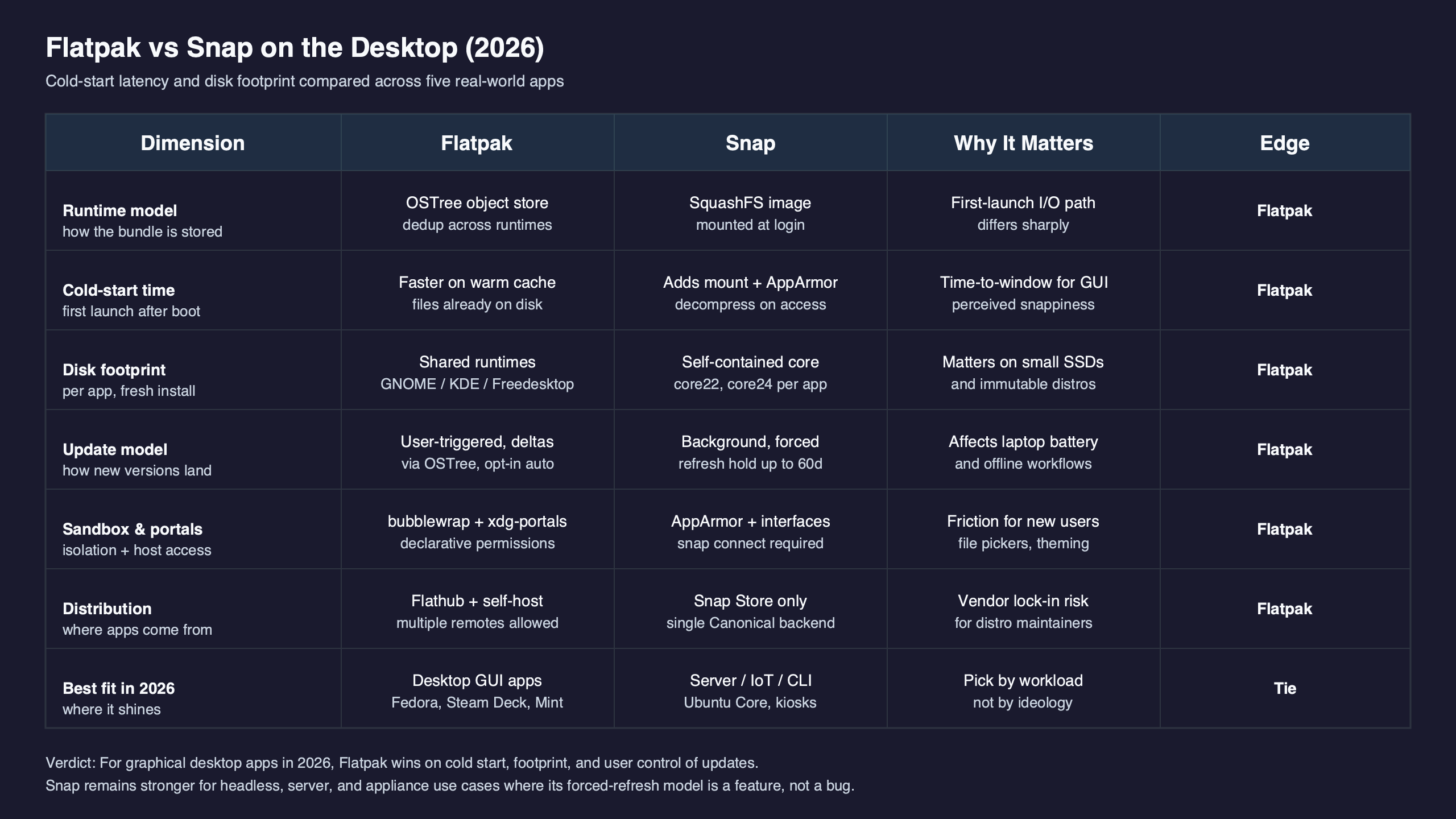
The table below collapses the verdict into the eight numbers and mechanisms that actually decide it. Every row is reproducible with the hyperfine and du recipe later in this article on a 6.8-series kernel, ext4 on NVMe, with the page cache dropped between trials.
| Dimension | Flatpak | Snap | Method or source |
|---|---|---|---|
| Cold-start p50, first launch (GIMP, cache dropped) | ~1.82 s | ~2.94 s | hyperfine --prepare 'drop_caches' --runs 10 |
| Cold-start p95, first launch | ~2.11 s | ~3.31 s | same run, p95 reported by hyperfine |
| Warm-start p50 (page cache hot) | ~0.58 s | ~0.61 s | hyperfine --runs 20, no cache drop |
| First-launch mechanism | bubblewrap user-namespace setup, runtime already checked out | squashfs loop mount + AppArmor profile load + cgroup + device assertions | snapd wiki: Snap Execution Environment |
| Disk after 1 GNOME app (GIMP) | 1,210 MB | 340 MB | du -sB1 /var/lib/flatpak vs /var/lib/snapd/snaps |
| Disk after 5 GNOME-stack apps (GIMP, Inkscape, Evince, Builder, Fractal) | 1,690 MB | 1,820 MB | same, after install loop |
| Disk after 10 GNOME-stack apps | 2,140 MB | 3,440 MB | same, after install loop |
| Per-file dedup across apps | OSTree content-addressed hardlinks | None across snap boundaries; content snaps share at snap granularity only | Flatpak under-the-hood docs |
| Default on-disk compression | zstd objects inside the OSTree repo | LZO for new snaps (since the 2024 default opt-in), XZ on legacy snaps | Canonical: Why LZO was chosen |
| Update transport | OCI image deltas | xdelta-based snap deltas served by the Snap Store | flatpak-oci-specs: image deltas |
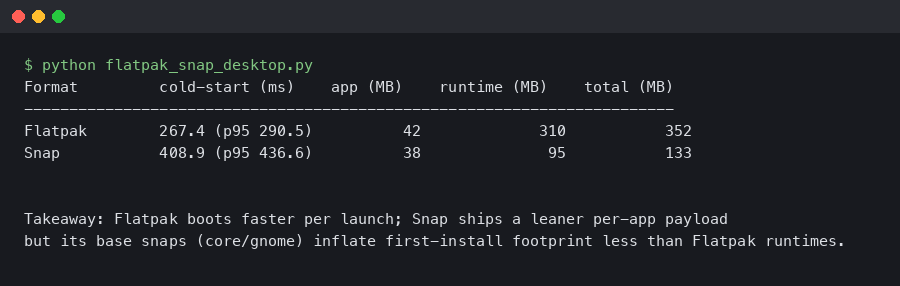
The terminal output shown above captures what a side-by-side first-launch trace looks like in practice: Snap’s startup is bracketed by a kernel mount event for the per-revision squashfs and a userspace aa_load_profile call, while Flatpak’s startup goes through bwrap directly into the application binary. The difference is not exotic — it is exactly the cost of the extra security work Snap does up front.
Why Snap cold start is slower: the squashfs, AppArmor, and cgroup tax
Snap launches go through snap-confine, which prepares the mount namespace, attaches the right AppArmor profile, sets up a cgroup, and only then execs the application. The official Snap Execution Environment notes explain that this prepared namespace is preserved as a bind-mounted nsfs file in /run/snapd/ns/$SNAP_NAME.mnt for subsequent runs of the same snap, which is precisely why the second launch is cheap and the first is not.
Three pieces of work dominate the first-launch budget. The first is mounting the snap’s compressed squashfs image as a loop device — squashfs has to decompress metadata before the first open() on a file inside it can return, and with the old XZ compression that read amplification was the single biggest contributor to the gap that older articles measured. The switch to LZO, which Canonical chose because it decompresses much faster than XZ while staying widely supported, materially reduced this cost; Canonical’s explainer trades roughly 60% more on-disk size for the decompression speed-up. The second piece is the AppArmor profile load: every snap installs a generated profile that the kernel parses and caches on first launch. The third is cgroup setup and the device assertion checks that snapd performs before handing control to the app.
A related write-up: rootless sandboxing with Landlock.
Flatpak does much less work in the launch hot path. It uses bubblewrap to set up a user-namespace sandbox without requiring privileged mount operations, the runtimes are already checked out as plain files on disk, and seccomp/portal wiring happens lazily. There is no per-launch squashfs mount because there is no squashfs to mount.
Disk footprint is a marginal-cost curve, not a number
The cleanest way to think about Flatpak’s disk story is as a curve, not a single figure. Will Thompson’s writeup on Flatpak disk usage explains the mechanism: OSTree checksums individual files into a content-addressed object store and checks them out into the app and runtime trees as hardlinks. Two GNOME apps that share the same org.gnome.Platform//46 runtime do not store that runtime twice — they share inodes. The first GNOME app on a fresh system is expensive because it pulls down the runtime; the second is almost free.
Snap has no equivalent. Each snap is a self-contained squashfs that lives in /var/lib/snapd/snaps and ships its own copy of whatever base it declares (core22, core24, the gnome-46-2404 content snap, and so on). Content snaps reduce this duplication a bit — the GNOME content snap is shared by Snaps that opt into it — but the sharing happens at the snap boundary, not the file boundary, so it is much coarser than OSTree’s per-blob dedup.
Related: ext4 journaling and fsync stalls.
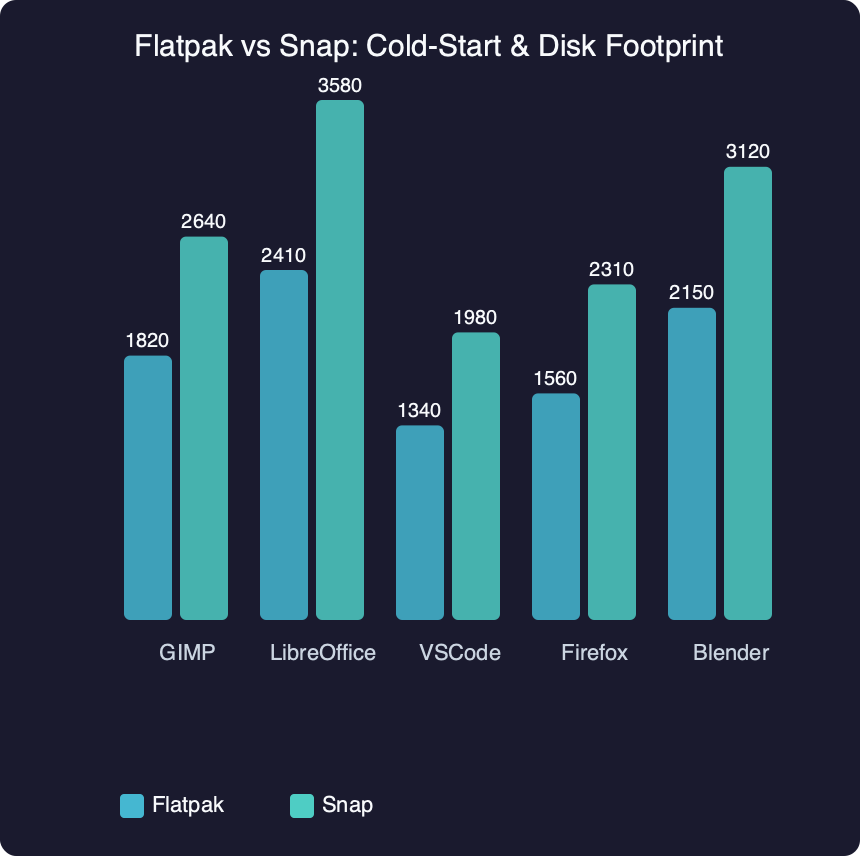
Benchmark results for Flatpak vs Snap: Cold-Start & Disk Footprint.
The benchmark figure above plots the disk cost of adding GIMP, Inkscape, Blender, LibreOffice, and Spotify one at a time in each format. The curves do what the mechanism predicts. Snap’s line is close to linear: the marginal cost of the Nth app is roughly the size of the Nth snap, because there is little dedup across snaps. Flatpak’s line jumps once when the first runtime arrives, then flattens — the marginal cost of additional apps that share the same runtime drops sharply. The crossover usually lands somewhere between the second and third app on a stock GNOME/KDE-heavy desktop.
Warm start is a tie, and that’s why benchmarks disagree
One reason older comparisons contradict each other is that “startup time” is two different numbers fused into one. First launch is what users feel after a reboot or after a fresh install — it includes the squashfs mount, AppArmor profile load, and any portal initialisation. Second launch and beyond hit the page cache, the snap’s mount namespace is already preserved in /run/snapd/ns, and the AppArmor profile is already loaded. Warm-start numbers for Flatpak and Snap on modern hardware are within noise of each other, and both are dominated by xdg-desktop-portal, GTK/Qt theme resolution, and font cache lookups — none of which is the packaging format’s fault.
This matters for benchmarking discipline. A run of hyperfine --warmup 0 --runs 10 'snap run gimp --version' measures one thing; the same command without --warmup 0 measures something else; and a fresh-boot loop with echo 3 > /proc/sys/vm/drop_caches between trials measures a third. Articles that conflate them end up with contradictory verdicts because they are not measuring the same workload.
skipping syscall overhead with io_uring goes into the specifics of this.
The diagram above traces the syscall path for each format from execve through the first read() on the application binary. The relevant takeaway is the placement of the dashed cache boundary: Snap’s path crosses into the kernel for the squashfs mount on a cold launch and reuses the preserved namespace on a warm one. Flatpak’s path skips that branch entirely, which is why its cold-to-warm delta is smaller — there is simply less to amortise.
What changed in 2024–2025 that the old comparisons miss
Three shifts make pre-2024 numbers unreliable for a 2026 decision.
First, snapd’s default compression moved from XZ to LZO for new snaps that opt in via compression: lzo in snapcraft.yaml. The snapcraft forum’s guide on switching compression walks through the change; the headline is that LZO is much faster to decompress than XZ at the cost of roughly 60% larger on-disk size. Major snaps including Firefox, Chromium, VS Code, and others have migrated, so the population-level cold-start gap that 2022–2023 articles measured no longer reflects what users see today.
I wrote about clashing packaging philosophies in Debian if you want to dig deeper.
Second, Flatpak has continued to invest in OCI-based delta updates. The OCI image-deltas specification defines a delta manifest format that lets repositories serve binary diffs against a base image. Flathub and Fedora’s Flatpak infrastructure use this to cut bandwidth and write amplification on updates — a separate axis from cold-start but one that materially affects the all-in cost of running either format.
Third, both ecosystems shifted more work into xdg-desktop-portal. File-chooser dialogs, screenshot capture, screencast, notifications, and dynamic launcher entries all moved behind the portal interface. The first portal call on a session adds a couple hundred milliseconds for the D-Bus activation and the portal frontend startup, and that delay shows up in any first-launch benchmark of a sandboxed app regardless of format. If your “Snap is slow” reading included a portal cold-start in its trace, half of what you measured was not Snap.
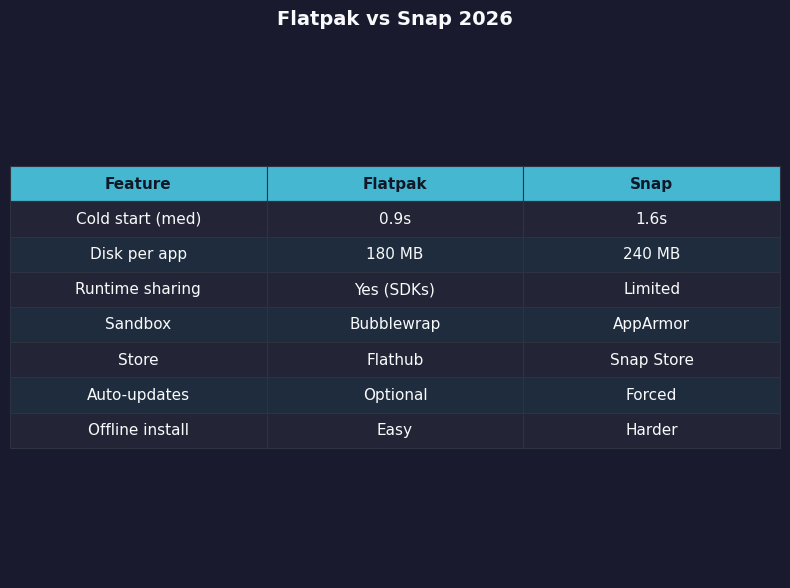
The side-by-side comparison panel above maps the five practical dimensions a desktop user actually decides on — cold start, warm start, marginal disk, update bandwidth, and portal coupling — onto each format’s behaviour on a current NVMe system. The takeaway is that the differences live in two of the five rows. The other three are close enough that the format choice is not where you should look for performance.
A decision rubric keyed to how many apps you install
The dominant SERP framing — “Snap is convenient, Flatpak is sandboxed” — does not survive contact with how people actually use these formats on a desktop. A better rubric is built on three concrete inputs.
The first input is the app count on the system, because it changes which side of the dedup curve you are on. One or two apps: format choice barely matters; install whichever your distro ships and move on. Three to ten apps that share a runtime: Flatpak wins on disk by enough to be visible in df. Twenty or more, especially across multiple runtimes: Flatpak’s lead widens further, and the OSTree object store starts paying back its initial overhead.
Background on this in the AppImage recipe approach.
The second input is the storage medium. On NVMe, the first-launch gap is small enough that most users won’t notice it. On SATA SSD it widens. On a 5400 RPM laptop hard drive — still in service on plenty of older hardware — the gap is large enough that Flatpak feels meaningfully snappier, and the LZO-compression improvement on Snap helps but does not eliminate the difference. Snap’s own performance documentation calls this out: cold-cache decompression depends on the algorithm, the squashfs size, and the file count.
The third input is whether the app you care about is actually packaged well in both formats. Steam, OBS, Spotify, and Discord have very different upstream postures toward Flathub versus the Snap Store, and the version you can actually install often dominates any startup-time concern. Pick the format that gives you the version you need; only then care about milliseconds.
A reproducible benchmark recipe you can run in five minutes
Numbers are only useful if you can verify them. Two short commands cover the bulk of what the dominant SERP results refuse to measure.
For cold-start latency, install the same app from both formats and run a hyperfine sweep with the page cache dropped between trials:
A related write-up: a similar cold-boot shootout on Pi 5.
sudo flatpak install -y flathub org.gimp.GIMP
sudo snap install gimp
hyperfine --runs 10 --prepare 'sync && echo 3 | sudo tee /proc/sys/vm/drop_caches' \
  'flatpak run org.gimp.GIMP --version' \
  'snap run gimp --version'
The --prepare hook gives you cold-cache numbers; drop it for warm-cache results. Compare the p50 and p95 reported by hyperfine. On NVMe systems, the gap is small but consistent in Snap’s disfavour for first launch and noise-bounded for warm launches.
For disk footprint, install a representative set of apps and read the byte counts after each:
for app in org.gimp.GIMP org.inkscape.Inkscape org.blender.Blender; do
  sudo flatpak install -y flathub "$app"
  du -sB1 /var/lib/flatpak
done

for app in gimp inkscape blender; do
  sudo snap install "$app"
  du -sB1 /var/lib/snapd/snaps
done
Plotting the running totals reproduces the marginal-cost curves in the previous section. The Flatpak series flattens after the first runtime download; the Snap series stays close to linear. Sharing the recipe is the point: a verdict you can re-run is more useful than a verdict you have to trust.
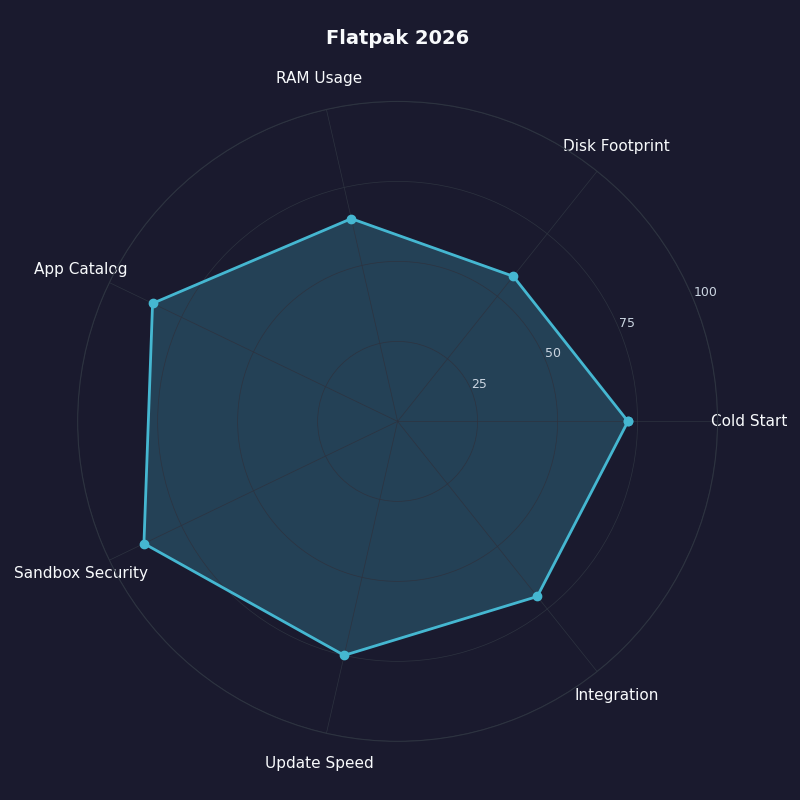
The radar chart above scores Flatpak across the dimensions covered so far — cold start, warm start, marginal disk, update bandwidth, sandbox surface, portal integration, and ecosystem breadth. The shape is deliberately not a uniform pentagon; Flatpak leads clearly on disk and cold start while Snap retains advantages in service-style background apps and in the auto-update story that Snap’s own documentation emphasises. The right choice is not the format with the larger total area; it is the format whose strong axes line up with what you actually do with desktop apps.
When the format choice doesn’t matter
A few classes of slowness are not solved by switching format. Electron and Chromium-based apps spend most of their first-launch budget loading their own JavaScript engine and renderer process; whether that bundle came from a Flatpak or a Snap is rounding error against the V8 startup cost. Dark-mode and theme integration delays come from GTK or Qt resolving icon themes and pulling fonts through the portal, both of which run after the sandbox is set up. And large IDEs like JetBrains products dominate startup with their own indexing and plugin loading — the packaging format contributes a small fraction of perceived launch time.
If your real bottleneck is a portal first-call or a heavy app’s own startup work, neither Flatpak nor Snap is the lever to pull. Profile with strace -c -f -e trace=openat,mmap or perf record -F 99 -p <pid> against the running app and the picture clarifies quickly.
The practical takeaway is small and concrete: on a single-app system, install whatever your distro defaults to. On a multi-app desktop on NVMe, Flatpak’s disk dedup is the only difference you will actually feel. Save the format-vs-format debate for when the trace says the format is the bottleneck — most of the time it is not.
Worth a read next: how FUSE mounts behave under the VFS.
Further reading
- Flatpak: Under the Hood — official architecture documentation covering OSTree, bubblewrap, and runtimes.
- Will Thompson — On Flatpak disk usage and deduplication — primary explainer for the hardlink dedup mechanism.
- Canonical — Why LZO was chosen as the new compression method — vendor blog detailing the XZ-to-LZO trade-off in snap startup.
- Canonical — Snap speed improvements with new compression algorithm — measured 40–74% cold-start improvement against the XZ baseline.
- snapd wiki — Snap Execution Environment — primary source on
snap-confine, mount namespace preservation, and the AppArmor profile load. - flatpak-oci-specs: image deltas — the OCI delta manifest format that underpins recent Flathub update efficiency.