Advanced Traffic Routing: Exposing Local Infrastructure via Cloud VPS and iptables
Introduction: The Renaissance of Self-Hosting and Network Traversal
In the constantly evolving landscape of **Linux networking news**, a resurgence of interest in self-hosting has driven enthusiasts and DevOps engineers to seek robust solutions for exposing local services to the public internet. With the proliferation of **Raspberry Pi Linux news** and powerful home lab hardware, users are increasingly running complex stacks—from **Nextcloud** to **Home Assistant**—behind residential routers. However, a significant hurdle remains: Carrier-Grade NAT (CGNAT) and dynamic residential IP addresses often make direct access impossible or insecure.
While modern solutions like Cloudflare Tunnels exist, there is a distinct trend in **Linux administration news** returning to “first principles” engineering. A highly effective, controllable, and privacy-centric method involves establishing a VPN tunnel between a local server and a cheap public cloud instance (VPS), then using the power of **iptables** to forward traffic. This architecture allows a user running **Debian news**, **Arch Linux news**, or **Fedora news** at home to leverage the static IP and high bandwidth of cloud providers like **AWS Linux news**, **DigitalOcean Linux news**, or **Linode**.
This article delves deep into the mechanics of this setup. We will explore how to orchestrate **iptables** (and its successor **nftables news**) to act as a transparent gateway, effectively turning a cloud instance into a front door for your local infrastructure. We will cover the necessary kernel configurations, **Linux VPN news** integrations (specifically WireGuard), and automation scripts using **Python Linux news** to manage these rules dynamically.
Section 1: Core Concepts and Architecture
To understand how to route traffic from a public cloud server to a private home server, we must dissect the packet flow. This setup relies heavily on **Linux kernel news** features regarding IP forwarding and Network Address Translation (NAT).
The architecture consists of three main components:
1. **The Public Gateway:** A VPS running a stable distribution like **Ubuntu news** or **CentOS news** (or its successors **AlmaLinux news** and **Rocky Linux news**). This server holds the public IP.
2. **The Tunnel:** A virtual network interface connecting the VPS and the Home Server. While **OpenVPN** is a classic choice, **WireGuard** has dominated **Linux VPN news** due to its inclusion in the kernel and high performance.
3. **The Local Target:** The machine running the actual service, potentially hosting **Docker Linux news** containers or **Kubernetes Linux news** clusters.
The Role of iptables
**iptables** functions by inspecting packets against a chain of rules. For this specific implementation, we are primarily concerned with the `nat` table. We need to perform two distinct operations:
* **DNAT (Destination NAT):** When a request hits the public IP of the VPS on a specific port (e.g., 443), we must rewrite the destination address to be the private VPN IP of the home server.
* **SNAT (Source NAT) / Masquerade:** When the packet is forwarded into the VPN tunnel, we often need to rewrite the source address so the home server knows to send the reply back to the VPS, rather than trying to route it out its own default gateway.
Before applying rules, IP forwarding must be enabled at the kernel level. This is a fundamental step in **Linux server news** guides but is often overlooked.
#!/bin/bash
# Enable IP Forwarding on the VPS
# This is required for the kernel to pass packets between interfaces (e.g., eth0 to wg0)

echo "Enabling IP Forwarding..."

# Write to sysctl.conf for persistence across reboots
if ! grep -q "net.ipv4.ip_forward=1" /etc/sysctl.conf; then
    echo "net.ipv4.ip_forward=1" >> /etc/sysctl.conf
fi

# Apply changes immediately
sysctl -p

# Check current status
CURRENT_STATUS=$(sysctl net.ipv4.ip_forward)
echo "Current Status: $CURRENT_STATUS"

# Load necessary kernel modules for NAT
modprobe iptable_nat
modprobe nf_nat

echo "Kernel preparation complete."
This script ensures that your **Red Hat news** or **SUSE Linux news** based server is actually capable of routing packets. Without `ip_forward`, the server will simply drop packets destined for other networks.
Section 2: Implementation Details and Rule Construction
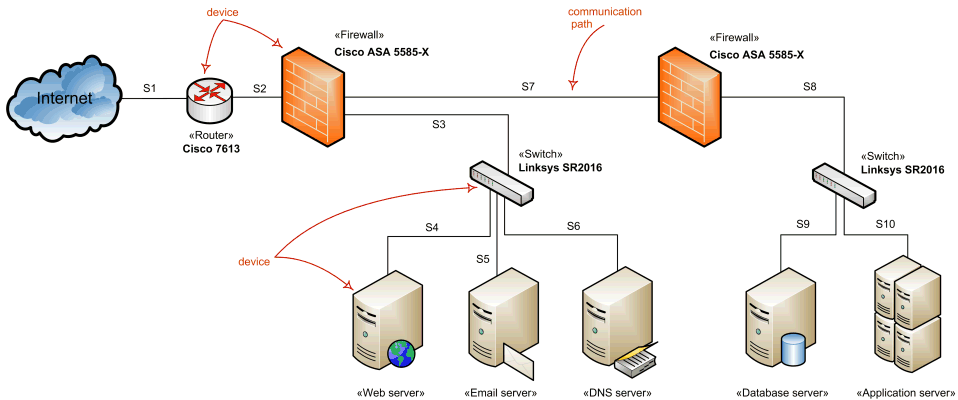
Once the VPN tunnel is established (let’s assume the interface is `wg0` and the home server’s VPN IP is `10.10.0.2`), we need to construct the **iptables** rules. This is where **Linux firewall news** meets practical application.
The logic follows this path:
1. **PREROUTING:** Intercept traffic coming into the public interface (`eth0`) on a specific port. Change the destination to `10.10.0.2`.
2. **FORWARD:** Allow the traffic to pass from `eth0` to `wg0`.
3. **POSTROUTING:** Change the source IP of the packet to the VPS’s internal VPN IP (e.g., `10.10.0.1`). This ensures the home server replies to the VPS, which then un-NATs the packet and sends it back to the original client.
Bash Implementation Script
Below is a robust script to apply these rules. It is compatible with most distributions, from **Linux Mint news** to **Kali Linux news**.
#!/bin/bash

# Configuration Variables
# PUBLIC_IF: The interface connected to the internet (usually eth0 or ens3)
# VPN_IF: The interface for the VPN tunnel (e.g., wg0, tun0)
# TARGET_IP: The VPN IP address of your home server
# TARGET_PORT: The port on the home server (e.g., 8080 for a web app)
# PUBLIC_PORT: The port to open on the VPS (e.g., 80)

PUBLIC_IF="eth0"
VPN_IF="wg0"
TARGET_IP="10.10.0.2"
TARGET_PORT="8080"
PUBLIC_PORT="80"

echo "Applying iptables rules for Port Forwarding..."

# 1. DNAT: Forward incoming traffic on PUBLIC_PORT to TARGET_IP:TARGET_PORT
iptables -t nat -A PREROUTING -i $PUBLIC_IF -p tcp --dport $PUBLIC_PORT -j DNAT --to-destination $TARGET_IP:$TARGET_PORT

# 2. FORWARD: Allow traffic to flow from Public Interface to VPN Interface
iptables -A FORWARD -i $PUBLIC_IF -o $VPN_IF -p tcp --dport $TARGET_PORT -d $TARGET_IP -j ACCEPT

# 3. FORWARD: Allow established connections to return
iptables -A FORWARD -i $VPN_IF -o $PUBLIC_IF -m state --state RELATED,ESTABLISHED -j ACCEPT

# 4. POSTROUTING (Masquerade): Rewrite source IP so traffic returns via the tunnel
# This is crucial if the home server has a different default gateway
iptables -t nat -A POSTROUTING -o $VPN_IF -j MASQUERADE

echo "Rules applied. Verifying..."
iptables -t nat -L PREROUTING -n -v | grep $PUBLIC_PORT
This setup is particularly popular in **Linux gaming news** circles for hosting game servers (like Minecraft or Valheim) without exposing a home IP, and in **Linux web servers news** for self-hosting **Nginx Linux news** or **Apache Linux news** instances securely.
Handling Persistence
A common pitfall discussed in **Linux troubleshooting news** is losing rules after a reboot. Unlike **firewalld** (common in **Fedora news**) or **UFW** (common in **Ubuntu news**), raw iptables commands are ephemeral.
To make them persistent, you should use `iptables-save`.
* On Debian/Ubuntu: `apt install iptables-persistent` and select “Yes” to save current rules.
* On RHEL/CentOS: `service iptables save`.
Section 3: Advanced Techniques and Automation
Managing firewall rules via bash scripts can become cumbersome, especially if you are managing multiple ports or dynamic endpoints. This is where **Linux automation news** and **Linux programming news** intersect. Using **Python**, we can create a more intelligent manager that checks for existing rules before applying new ones, preventing duplicate entries—a common issue in **Linux DevOps news**.
We can interact with the system using the `subprocess` module or dedicated libraries like `python-iptables`. Below is a Python utility that manages these forwarding rules idempotently.
import subprocess
import sys

def run_command(command):
    """Executes a shell command and returns the output."""
    try:
        result = subprocess.check_output(command, shell=True, stderr=subprocess.STDOUT)
        return result.decode('utf-8').strip()
    except subprocess.CalledProcessError as e:
        print(f"Error executing command: {e.output.decode('utf-8')}")
        return None

def add_forwarding_rule(public_port, target_ip, target_port, protocol="tcp"):
    """
    Adds iptables rules for forwarding if they don't already exist.
    """
    print(f"Configuring forwarding: Public :{public_port} -> {target_ip}:{target_port} ({protocol})")

    # Check for existing DNAT rule to avoid duplication
    check_cmd = f"iptables -t nat -C PREROUTING -p {protocol} --dport {public_port} -j DNAT --to-destination {target_ip}:{target_port}"

    try:
        subprocess.check_call(check_cmd, shell=True, stderr=subprocess.DEVNULL)
        print(" -> Rule already exists. Skipping.")
    except subprocess.CalledProcessError:
        # Rule does not exist, apply it
        dnat_cmd = f"iptables -t nat -A PREROUTING -p {protocol} --dport {public_port} -j DNAT --to-destination {target_ip}:{target_port}"
        run_command(dnat_cmd)
        print(" -> DNAT rule applied.")

        # Ensure Masquerading is active (simplified check)
        masq_cmd = "iptables -t nat -A POSTROUTING -o wg0 -j MASQUERADE"
        # In a real scenario, you would check this specifically too
        # run_command(masq_cmd)
        print(" -> Ensure you have MASQUERADE enabled on the VPN interface.")

def main():
    # Example: Forwarding SSH and a Web Server
    rules = [
        {"public": 2222, "target_ip": "10.10.0.2", "target": 22},
        {"public": 80, "target_ip": "10.10.0.2", "target": 8080},
        {"public": 443, "target_ip": "10.10.0.2", "target": 8443}
    ]

    for rule in rules:
        add_forwarding_rule(rule["public"], rule["target_ip"], rule["target"])

if __name__ == "__main__":
    if subprocess.call("id -u", shell=True) != 0:
        print("This script must be run as root.")
        sys.exit(1)
    main()
This approach aligns with **Linux configuration management news**, allowing you to integrate rule application into **Ansible news** playbooks or **SaltStack news** states. It ensures that your **Linux cloud news** infrastructure remains consistent.
Security Considerations with Fail2Ban
Exposing a port on a VPS means it is immediately subject to scanning. **Linux security news** frequently highlights the importance of intrusion prevention. You can configure **Fail2Ban** on the VPS to monitor traffic. However, because the traffic is being forwarded, standard log monitoring might be tricky.
You should configure logging on the `FORWARD` chain.
# Log dropped forward packets for analysis
iptables -N LOGGING
iptables -A FORWARD -j LOGGING
iptables -A LOGGING -m limit --limit 2/min -j LOG --log-prefix "IPTables-Dropped: " --log-level 4
iptables -A LOGGING -j DROP
By analyzing these logs with tools like **Graylog** or the **ELK Stack news** (Elasticsearch, Logstash, Kibana), you can gain observability into who is trying to access your home lab.
Section 4: Best Practices and Optimization

When deploying this architecture, several best practices from the **Linux performance news** and **Linux networking news** domains should be observed.
1. The Shift to nftables
While `iptables` is the keyword of the day, it is technically a legacy tool. Modern distributions like **Debian 11+**, **RHEL 8+**, and **Arch Linux** utilize **nftables** as the backend. The `iptables` command is often just a wrapper (`iptables-nft`).
For future-proofing your **Linux administration news** skills, consider translating these rules to `nftables`. The syntax is more readable and combines IPv4 and IPv6 processing.
2. MTU Optimization
Tunneling adds overhead. If you are reading **Linux networking news**, you know that MTU (Maximum Transmission Unit) issues can cause packet fragmentation and connection drops.
* Standard Ethernet MTU: 1500 bytes.
* WireGuard overhead: Usually requires reducing MTU to 1420 or 1360.
Ensure your VPS interface and the home server VPN interface have matching MTU settings to avoid “black hole” connections where handshakes work but bulk data (like loading a webpage) fails.
3. Monitoring and Observability
Don’t fly blind. Use **Prometheus news** exporters (like `node_exporter` with the textfile collector) to dump iptables packet counts. Visualize this in **Grafana news**. This allows you to see traffic spikes in real-time.
Furthermore, if you are using **Docker Linux news**, ensure your Docker daemon doesn’t conflict with your custom iptables rules. Docker modifies the `nat` table aggressively. Setting `”iptables”: false` in `daemon.json` is a nuclear option, but often necessary for complex custom routing.
4. Distribution Specifics
* **Alpine Linux news**: If using Alpine for a lightweight VPS, you must install `iptables` and `ip6tables` explicitly and use `lbu` to save changes if running from RAM.
* **NixOS news**: NixOS handles firewalling declaratively in `configuration.nix`. You would use `networking.nat.enable = true;` and `networking.nat.forwardPorts` rather than manual scripts.
* **Gentoo news**: You will likely need to compile the kernel with specific `NETFILTER` options enabled manually.
Conclusion
The combination of a cloud VPS and **iptables** provides a powerful mechanism to bypass the limitations of residential internet connections. It bridges the gap between the isolated **Linux home lab** and the public internet, enabling secure, controlled access to self-hosted services.
Whether you are a sysadmin following **Red Hat news**, a developer tracking **Python Linux news**, or a hobbyist tinkering with **Raspberry Pi Linux news**, mastering traffic redirection is a fundamental skill. While tools like **nftables** and **eBPF** (often discussed in **Linux kernel news**) represent the future, `iptables` remains the lingua franca of Linux networking.
By implementing the scripts and architectures discussed above, you can effectively create your own private edge network, leveraging the reliability of the cloud while maintaining data sovereignty on your own hardware. As you advance, consider integrating these setups with **Ansible news** for automation or **WireGuard** for modern encryption, ensuring your infrastructure is not just functional, but also secure and maintainable.