

Deep Dive into Linux Netfilter Security: Mitigating Heap Overflows and Mastering nftables
Introduction: The Evolving Landscape of Linux Kernel Security
The landscape of Linux security news is in a constant state of flux, driven by the relentless discovery of vulnerabilities and the equally rapid development of patches and mitigation strategies. Recently, the cybersecurity community has turned its attention back to the Linux kernel, specifically the Netfilter subsystem. Netfilter is the framework inside the Linux kernel that allows various networking-related operations to be implemented in the form of customized handlers. It is the foundation upon which Linux firewall news and tools like iptables and its modern successor, nftables, are built.
Understanding the intricacies of kernel vulnerabilities, such as heap buffer overflows, is crucial for system administrators, DevOps engineers, and security professionals. Whether you are tracking Ubuntu news for LTS stability, Fedora news for bleeding-edge features, or Arch Linux news for rolling updates, the integrity of the packet filtering subsystem affects every distribution. From Red Hat news covering enterprise servers to Android devices running on the Linux kernel, the reach of Netfilter is ubiquitous.
In this comprehensive article, we will explore the mechanics of Netfilter vulnerabilities, specifically focusing on how heap overflows in the nft_set_elem_init function can lead to Local Privilege Escalation (LPE). We will move beyond the headlines to provide actionable technical insights, Linux administration news, and practical code examples to audit and harden your systems against these types of threats. We will also touch upon how this impacts the broader ecosystem, including Docker Linux news, Kubernetes Linux news, and cloud environments like AWS Linux news.
Section 1: Core Concepts of Netfilter and nftables Sets
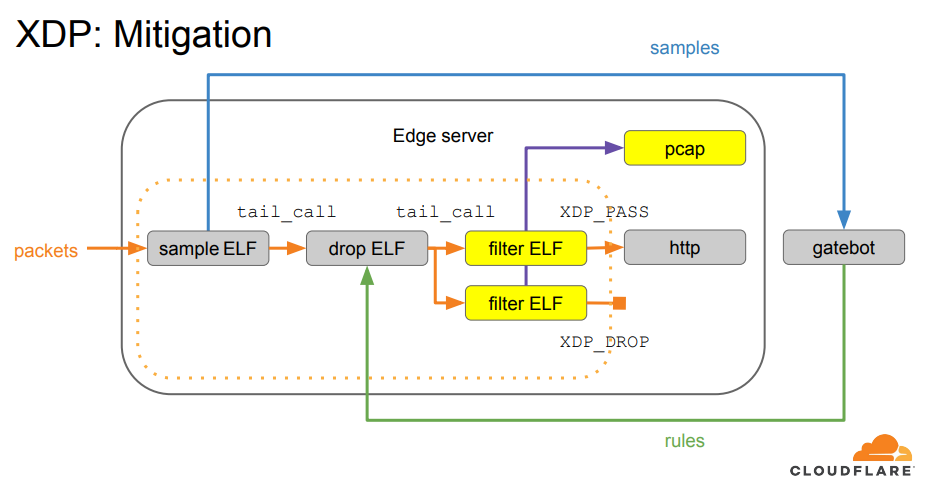
To understand recent vulnerabilities, one must first grasp the architecture of the Linux firewall. For years, iptables news dominated the conversation, but the community has largely shifted toward nftables. nftables news highlights its performance improvements and unified interface for IPv4, IPv6, ARP, and bridge filtering. Unlike the linear processing of iptables, nftables uses a virtual machine approach to process packets, which is significantly more efficient.
A critical component of nftables is the concept of “sets.” Sets allow you to match multiple IP addresses, port numbers, or other criteria in a single rule, drastically reducing the number of rules the kernel must evaluate. This is excellent for Linux performance news, but it also introduces complexity in memory management.
Recent security discussions have centered on how the kernel handles the initialization of elements within these sets. Specifically, vulnerabilities often arise when the kernel fails to properly validate the size of data being allocated to the heap during the creation of a set element with a verdict. If an attacker can manipulate this allocation, they can corrupt adjacent memory structures.
Below is an example of how to configure an nftables set properly. Understanding this structure is key to understanding where the logic errors in the kernel code can occur.
#!/usr/sbin/nft -f

# Flush the ruleset to start fresh
flush ruleset

table inet filter {
    # Define a set named 'blackhole' for blocked IPs
    set blackhole {
        type ipv4_addr
        flags interval
        elements = { 192.168.1.100, 10.0.0.5 }
    }

    chain input {
        type filter hook input priority 0; policy accept;

        # Drop traffic from IPs in the blackhole set
        ip saddr @blackhole drop

        # Allow established and related connections
        ct state established,related accept

        # Allow loopback
        iifname "lo" accept

        # Allow SSH (adjust port as necessary)
        tcp dport 22 accept
    }

    chain forward {
        type filter hook forward priority 0; policy drop;
    }

    chain output {
        type filter hook output priority 0; policy accept;
    }
}
In the context of Linux networking news, the vulnerability typically lies in the kernel code that parses these configurations (specifically nested attributes in Netlink messages) rather than the user-space configuration itself. However, knowing how sets are constructed helps administrators visualize the attack surface. When a user (or a malicious local process) sends a request to add an element to a set, the kernel allocates memory. If the inputs are crafted to confuse the kernel about the required size, a buffer overflow occurs.
This is particularly relevant for Linux containers news. If a container has the CAP_NET_ADMIN capability (which is common in Podman news or specific Docker Linux news configurations), an attacker inside the container could trigger this kernel vulnerability to escape the container and gain root access to the host.
Section 2: Analyzing the Risk and Auditing the System
Executive leaving office building – Exclusive | China Blocks Executive at U.S. Firm Kroll From Leaving …
The impact of a Netfilter heap overflow is generally classified as Local Privilege Escalation (LPE). This means an attacker must already have shell access to the system. While this reduces the risk compared to Remote Code Execution (RCE), it is a critical vector for multi-stage attacks. In the world of Linux incident response news, LPEs are the bridge between a compromised web service and full server control.
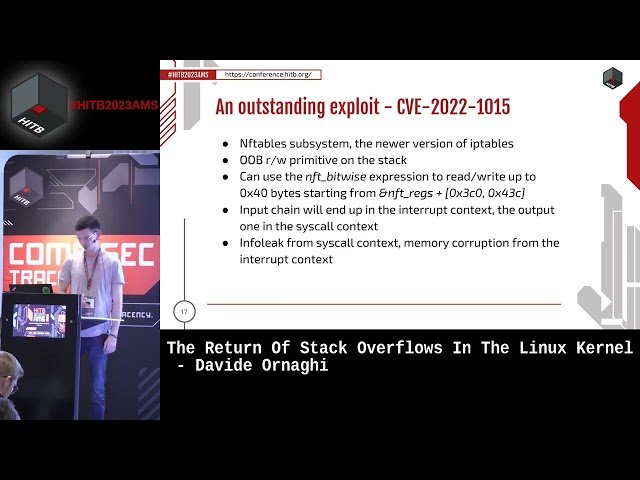
The vulnerability often exploits the interaction between the nft_set_elem_init function and the underlying memory allocator. In C Linux news and Linux kernel news, we learn that the kernel uses a slab allocator. By overflowing a chunk on the heap, an attacker can overwrite pointers in adjacent objects, potentially redirecting execution flow to malicious code.
Auditing for Vulnerable Configurations
To determine if your system might be susceptible, you need to check your kernel version and whether the nf_tables module is loaded. While Linux distribution news sources like Debian news or Rocky Linux news will publish specific version numbers that are patched, a generic audit script is useful for any administrator.
The following Python script utilizes standard libraries to check the kernel version and inspect loaded modules. This is relevant for those following Python Linux news and Linux automation news.
import platform
import subprocess
import sys

def check_kernel_vulnerability():
    print("--- System Audit for Netfilter Risks ---")

    # 1. Check Kernel Version
    kernel_version = platform.release()
    print(f"[*] Current Kernel Version: {kernel_version}")

    # Note: In a real scenario, compare this string against a list of known patched versions
    # specific to your distribution (e.g., Ubuntu, RHEL, Arch).

    # 2. Check if nf_tables module is loaded
    try:
        lsmod_output = subprocess.check_output(['lsmod'], text=True)
        if 'nf_tables' in lsmod_output:
            print("[!] WARNING: 'nf_tables' module is currently loaded.")
            print("    If unpatched, this system may be vulnerable to specific heap overflows.")
        else:
            print("[*] 'nf_tables' module is NOT loaded. Risk is mitigated if not dynamically loaded.")

    except subprocess.CalledProcessError as e:
        print(f"[!] Error checking modules: {e}")

    # 3. Check for User Namespaces (often used in exploits)
    try:
        with open('/proc/sys/user/max_user_namespaces', 'r') as f:
            max_userns = int(f.read().strip())
            if max_userns > 0:
                print(f"[!] User Namespaces enabled (max: {max_userns}).")
                print("    Attackers often use unprivileged user namespaces to trigger network namespaces.")
            else:
                print("[*] User Namespaces are disabled.")
    except FileNotFoundError:
        print("[*] Unable to determine user namespace configuration.")

if __name__ == "__main__":
    check_kernel_vulnerability()
This script highlights a crucial aspect of Linux security news: the intersection of kernel modules and user namespaces. Many exploits rely on creating a new user namespace to gain the CAP_NET_ADMIN capability within that namespace, allowing the user to interact with Netfilter even if they are unprivileged on the host. This is a recurring theme in Linux virtualization news and LXC news.
Section 3: Advanced Mitigation and Hardening Techniques
Once a vulnerability is disclosed in Linux open source news outlets, the race to patch begins. However, applying patches immediately isn’t always possible in production environments, especially for those managing complex clusters in Linux cloud news environments like Google Cloud Linux news or Azure Linux news. Therefore, mitigation strategies are essential.
1. Disabling Unprivileged User Namespaces
As mentioned in the audit section, disabling unprivileged user namespaces is a powerful mitigation technique. This prevents a low-privileged attacker from creating the networking context required to trigger the Netfilter bug. This is a common recommendation in Linux hardening news.
2. Blacklisting Vulnerable Modules
If your server does not require nftables (for example, if you are strictly using legacy iptables without the translation layer, or if it’s a specialized appliance), you can blacklist the module. This prevents the kernel from loading the vulnerable code.
Executive leaving office building – After a Prolonged Closure, the Studio Museum in Harlem Moves Into …
Below is a Bash script that automates these hardening steps. This aligns with Linux shell scripting news and best practices found in Linux DevOps news.
#!/bin/bash

# Hardening Script for Netfilter Vulnerabilities
# Run as root

echo "Starting System Hardening..."

# 1. Disable Unprivileged User Namespaces (Temporary)
# This stops many LPE exploits that require CAP_NET_ADMIN in a new namespace
sysctl -w kernel.unprivileged_userns_clone=0

# Persist the change
if ! grep -q "kernel.unprivileged_userns_clone" /etc/sysctl.conf; then
    echo "kernel.unprivileged_userns_clone=0" >> /etc/sysctl.d/99-security.conf
    echo "[+] Disabled unprivileged user namespaces permanently."
else
    echo "[*] User namespaces already configured in sysctl."
fi

# 2. Blacklist nf_tables if not in use
# WARNING: Only do this if you are SURE you don't need nftables.
# Many modern firewalls (firewalld, ufw) depend on it.

MODULE_NAME="nf_tables"

if lsmod | grep -q "$MODULE_NAME"; then
    echo "[!] Module $MODULE_NAME is currently loaded."
    echo "    Cannot blacklist without unloading. Check dependencies."
else
    echo "blacklist $MODULE_NAME" > /etc/modprobe.d/blacklist-nftables.conf
    echo "install $MODULE_NAME /bin/true" >> /etc/modprobe.d/blacklist-nftables.conf
    echo "[+] Blacklisted $MODULE_NAME to prevent loading."
fi

# 3. Update Package Repositories (Generic)
# Detect package manager
if command -v apt-get > /dev/null; then
    echo "[*] Detected Debian/Ubuntu/Kali system."
    apt-get update && echo "[*] Repositories updated. Run upgrade manually."
elif command -v dnf > /dev/null; then
    echo "[*] Detected RHEL/CentOS/Fedora system."
    dnf check-update
elif command -v pacman > /dev/null; then
    echo "[*] Detected Arch/Manjaro system."
    pacman -Sy
fi

echo "Hardening steps complete. Please schedule a kernel update."
This script touches on several areas of Linux package managers news. Whether you are using apt (Linux Mint news, Kali Linux news), dnf (AlmaLinux news, Oracle Linux news), or pacman (EndeavourOS news, Manjaro news), the principle remains the same: limit the attack surface until the binary patch is applied.
Section 4: Best Practices and Long-Term Optimization
Dealing with Linux firewall news and vulnerabilities is not a one-time event; it is a continuous process. Organizations must adopt a posture of “Security by Design.” This involves not just patching, but also robust configuration management and monitoring.
Configuration Management
Manual patching is prone to error. In the realm of Linux orchestration news and Linux configuration management news, tools like Ansible, Puppet, and Chef are indispensable. They ensure that every server in your fleet—from a Raspberry Pi Linux news project to a massive Linux server news farm—receives the same security policy.
Here is an Ansible playbook example that ensures the kernel is updated and the firewall is active. This is highly relevant for professionals following Ansible news and Red Hat Certified Engineer (RHCE) news.
Executive leaving office building – Exclusive | Bank of New York Mellon Approached Northern Trust to …
---
- name: Secure and Update Linux Nodes
  hosts: all
  become: yes
  tasks:
    - name: Ensure the kernel is up to date (Debian/Ubuntu)
      apt:
        name: linux-image-generic
        state: latest
        update_cache: yes
      when: ansible_os_family == "Debian"

    - name: Ensure the kernel is up to date (RHEL/CentOS)
      dnf:
        name: kernel
        state: latest
      when: ansible_os_family == "RedHat"

    - name: Ensure nftables is installed
      package:
        name: nftables
        state: present

    - name: Enable and start nftables service
      service:
        name: nftables
        state: started
        enabled: yes

    - name: Check for reboot requirement
      stat:
        path: /var/run/reboot-required
      register: reboot_required_file
      when: ansible_os_family == "Debian"

    - name: Reboot if kernel updated
      reboot:
        msg: "Rebooting due to kernel security update"
      when: reboot_required_file.stat.exists is defined and reboot_required_file.stat.exists
Monitoring and Observability
You cannot defend what you cannot see. Linux observability news tools like Prometheus news and Grafana news, combined with logging stacks like the ELK Stack news (Elasticsearch, Logstash, Kibana) or Loki news, are vital. You should monitor for:
- Unexpected kernel messages (dmesg) indicating segmentation faults.
- Changes in loaded kernel modules.
- Spikes in CPU usage by system processes, which might indicate an exploit attempt looping or failing.
Furthermore, utilizing Linux SELinux news and AppArmor news profiles adds a layer of Mandatory Access Control (MAC). Even if an attacker exploits a heap overflow to gain code execution, a strict SELinux policy can prevent them from accessing sensitive files or opening reverse shells, effectively neutralizing the payload.
Conclusion
The discovery of vulnerabilities in the Netfilter subsystem serves as a stark reminder of the complexity inherent in modern operating systems. For those following Linux firewall news, it underscores the importance of transitioning from legacy tools to modern frameworks like nftables, while simultaneously maintaining a rigorous patch management schedule. Whether you are a hobbyist reading Linux gaming news on a Steam Deck or a sysadmin managing critical infrastructure covered in Linux enterprise news, the kernel is the common denominator.
To stay secure, administrators must move beyond reactive patching. Implementing defense-in-depth strategies—such as disabling unprivileged user namespaces, utilizing configuration management tools like Ansible, and enforcing strict MAC policies with SELinux or AppArmor—is essential. By staying informed through Linux security news and understanding the technical mechanics of these vulnerabilities, you can transform your infrastructure from a target into a fortress.
Next Steps: Immediately audit your systems for the nf_tables module usage, check your kernel versions against the latest CVE disclosures, and test the provided hardening scripts in a staging environment before rolling them out to production.



